
Known issues#
Similarity or Random Forest causes QGIS to crash#
This crash is due to a bug during geopandas reading of a shapefile, only when it has allready read a shapefile. It is probably linked to fiona as well. If you have any idea on how to solve this, please do participate in the corresponding issue.
Meanwhile, if QGIS crashes and your file were not saved, you can still find them in the temp files like /tmp/iamap_features for instance.
QGIS crashes at the start of encoding#
This issue should be solved but the solution has not been tested on all OSes. This is an issue with rtree during the creation of the dataset that will be used by the plugin.
Indeed, depending on the installation, rtree and QGIS may have conflicting libspatialindex. Currently, there is several solutions:
1. Uninstall rtree installed via pip and reinstall via package manager#
in the QGIS python console:
(following code has not been tested, based on this SE answer)
import subprocess
import sys

if sys.platform == 'win32':
    subprocess.call([sys.exec_prefix + '/python', "-m", 'pip', 'unininstall', 'rtree'])
else:
    subprocess.call([sys.executable, '-m', 'pip', 'uninstall', 'rtree'])
then in a terminal (for a debian based linux)
sudo apt-get install python3-rtree
2. Uninstall rtree installed via pip and reinstall rtree at an older version (<1.0.0)#
in the QGIS python console:
(following code has not been tested, based on this SE answer)
import subprocess
import sys

if sys.platform == 'win32':
    subprocess.call([sys.exec_prefix + '/python', "-m", 'pip', 'unininstall', 'rtree'])
    subprocess.call([sys.exec_prefix + '/python', "-m", 'pip', 'install', 'rtree==0.9'])
else:
    subprocess.call([sys.executable, '-m', 'pip', 'uninstall', 'rtree'])
    subprocess.call([sys.executable, "-m", 'pip', 'install', 'rtree==0.9'])
3. Use a conda environement.#
This way, rtree and qgis will automatically share the same libspatialindex.
If you have any idea on how to solve this issue properly, do participate in the corresponding issue.
libspatialindex error with geopandas#
On a fresh install, geopandas might not find the correct libspatialindex, then as for the previous error, you can install the libspatialindex on your system via
sudo apt-get install python3-rtree
UMAP crashes#
If you’re using Windows, the use of UMAP may cause the plug-in to crash QGIS when using it. If this issue happens we recommend to go in the algo.py file of this plug in and comment the line :²
import umap
Then save the change, reload the plug-in and try again.
Major tilling efects#
After encoding, it is common to see tilling effect, however, sometimes, these effects are overwhelming (for instance if you can only see a color gradient on every tile and no local features).
The issue might be a normalization issue, with every tile fed to the network being wrongfully normalized.
The root of the problem may be the meta-data of your raster, check that the STATISTICS_MEAN and STATISTICS_STDDEV are correct, because these are the ones used by the plugin if they exist.
The following command could potentially solve meta-data issues.
gdal_edit.py -stats your_file.tif
Conflicting requirements for UMAP#
umap has numba as a dependdencie, which may require numpy < 2.0 and conflict with other librairies depending on how you installed them. According to numba developpers, this
should be resolved in comming numba releases.
In the mean time, you can use a conda environement or uninstall and reinstall numpy at a previous version.
Rasterio error after 499 batches in Windows#
You can encounter an error like the following:
rasterio._err.CPLE_AppDefinedError: Deleting C:\Users\User\AppData\Local\Temp\iamap_features\9e156c7bae06cfb63493fc0f4a0f8225\merged_tmp.tif failed: Permission denied
The encoding algorithm merges temporary files periodically (by default 500). Afterwards it cleanes the old temp files to leave space. This error is because you probably have deleting rights in the default temporary folder. Try to choose an other folder or to get in touch with your IT support.
This error should be resolved but if you encounter similar issues, do mention it on the relevant GitHub issue
Large bands on the feature raster#
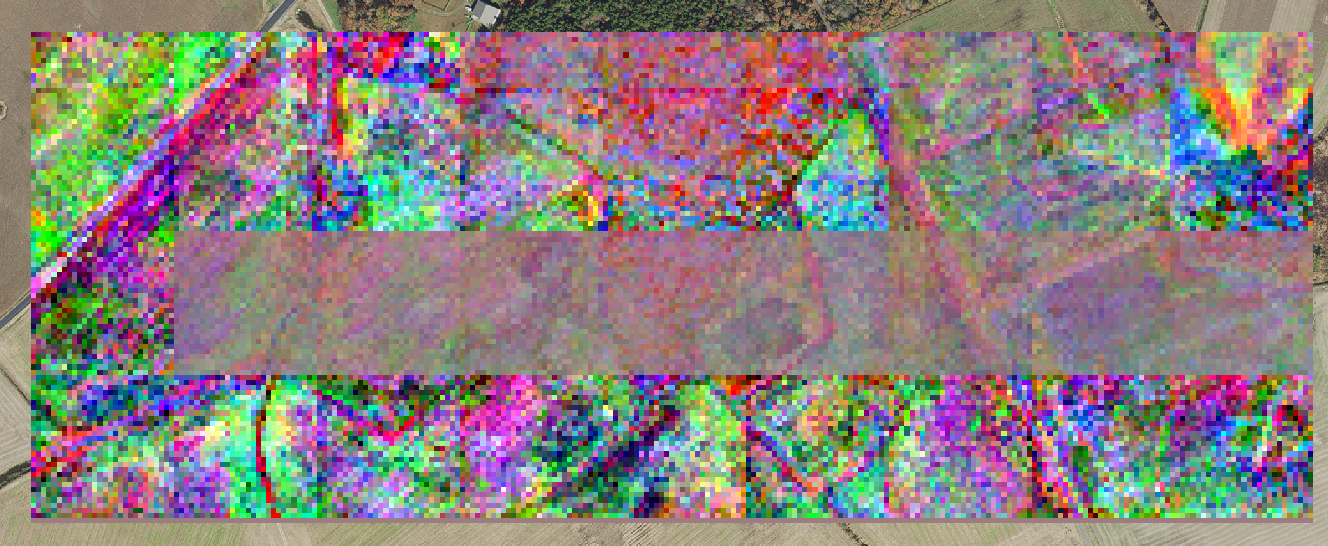
If you see such bands on your raster, chances are that you have selected the average merge method.
Regularly, infered tiles are merged together. If this does not form a rectangle, rasterio fills the remainder with a constant value.
Afterwards, when larger tiles are merged together, the remainder is averaged with the following infered tiles.
The easiest solution would be to change the merge method used. However, if you need to use the average merge method, then you could try to decrease the frequency at which tiles are merge together. Otherwise, you can set the merge frequency to a multiple of the number of tiles you’ll have in a width of the raster such as to always have a rectangle.