
FAQ#
How does a ViT work ?#
Understanding the functionning of a ViT can help understand the outputs of the encoder algorithm in the plugin. ViTs (Vision Transformers) are the leading deep learning architecture for image analysis since 2021. Their architecture is inspired by the original transformer architecture used in natural language processing (NLP). Transformers are for instance the architecture from ChatGPT etc.
A transformer takes as input a series of tokens and projects them in a high-dimension feature space where their meaning is encoded. Additionnaly, the attention mechanism helps to encode how the different tokens relate to each others. In NLP, these tokens can be words and ponctuation, with the attention mechanism helping to take the context into account. For instance, the word “Queen” will not have the same meaning depending if your are talking about Elizabeth II, chess or Freddy Mercury. Then, the position of this token is updated in the feature space to better fit the meaning in the current context (for instance if the words “God save …”, “Gambit” or “Bohemian” are nearby).
ViTs do the same with images but taking every pixel of an image as input in place of words would be prohibitly expensive. In 2021, Dosovitskiy et al. found that using patches of 16x16 pixels achieves good results in most computer vision tasks. The following figure shows a summary of what happens inside a ViT (adapted from Dosovitskiy et al. 2021).
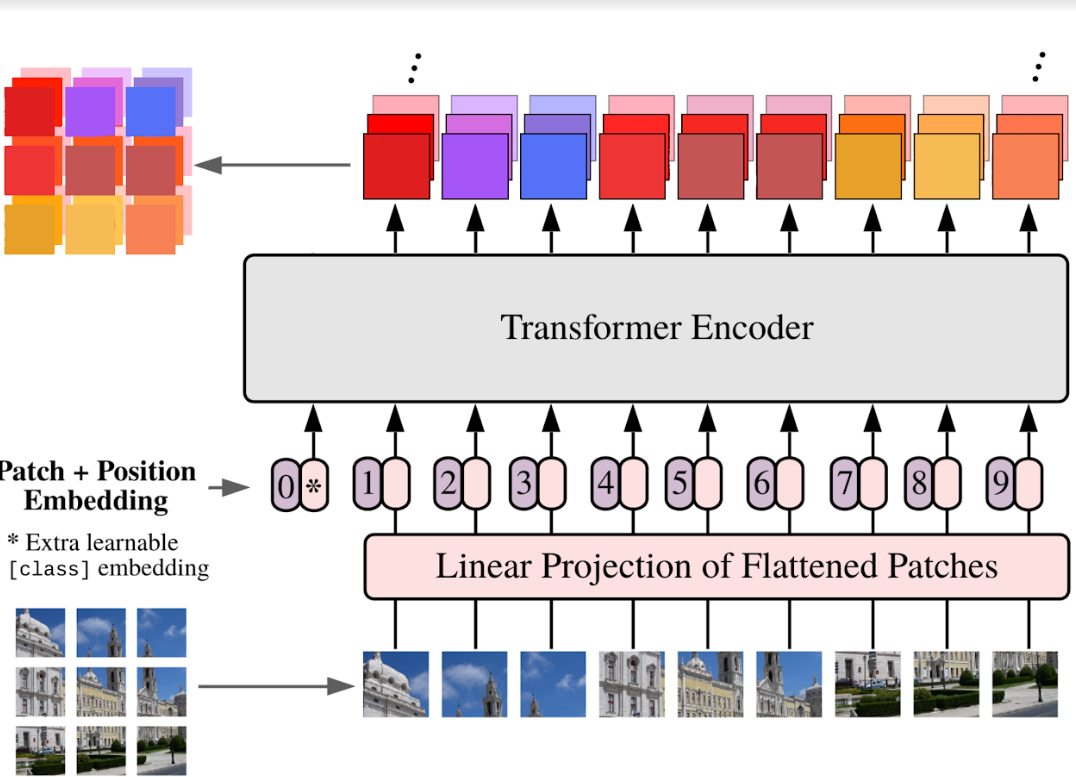
The input image is split into patches that become the input tokens of the transformer (with their relative position being encoded as well).An additional token (called “CLS token”, for “class token”) keeps track of general informations about the image while patch tokens describe the patch they are from (refined by the surronding context thanks to the attention mechanism). After several passes through transformer blocks, the resulting features can be used for a downstream task or in our case, kept and reassembled to be saved into a Geotiff.
Then, the resolution of a resulting feature map in our plugin will depend on the patch size of the ViT used for encoding. If a model with a patch size of 14 is used, one pixel from the feature map will correspond to 14x14 pixels in the input raster. However, the resulting feature dimensions should be informative and take this 14x14 context as well as the surrounding patches into account.
How does it handle more than three band images with pretrained models ?#
Our models are created using the timm librairy, which is widely used in deep learning research. Here is the doc explaining how they handle non-RGB images when loading pre-trained models.
How can I avoid tiling effects ?#
You can create an overlap by selecting a stride smaller than the sampling size of your raster. In the advanced options, you can change how the tiles will be merged afterwards.
How can I obtain a better resolution ?#
This plugin was developped with ViTs in mind as template models. These have spatialy explicit features and divide the image into patches of typially 16x16 or 14x14 pixels. By having a smaller sampling size, you will have better resolution but with less context for the model to work with.
Using a model with smaller patch size will also in the end lead to a better resolution but these models are often heavier.
Which model should I use ?#
We’ve selected some state of the art models that seem to work well on our usecases so far. If you are short in RAM, prefer using the ViT Tiny model, that is almost ten times smaller than the others (but can provide a less nuanced map).
Can I use any model from HuggingFace ?#
HuggingFace is one of the largest hub where pre-trained deep learning models are published (at of time of writing, they have over 1 million models available).
It is an essential tool to follow the deep learning state of the art and one of the de facto standards for sharing models.
They have now partnered with the timm library, that was one of the most used libraries used by the community to initialize models and load pre-trained weights.
While this opens a very wide range of model usable with the plugin, not all models can be used out of the box.
Indeed, our code is optimized for ViT-like models that output patch-level features. If you use another type of architecture, it may work but it probably won’t.
It is best to use the models provided directly by timm, you can find the list there.
However, you can also use other pre-trained models available on HuggingFace. As stated in their docs, timm can recognise some.
Then, when you input the name of the model in the plugin, you have to add the hf-hub: prefix before the model card name.
'hf-hub:nateraw/resnet50-oxford-iiit-pet'
If a model is unavailable, you can try to update timm.
Why doesn’t this projection, clustering or classification algorithm work ?#
All algorithms provided by sklearn used in this plugin are not yet extensively tested.
We select all algorithms that share a common API and should a priori work correctly.
However, some algorithms may expect other data format and might be unusable out of the box.
In this case, your feedback is more than welcome, do not hesitate to fill an issue on github.
The algorithms that are proprely tested for now are PCA, UMAP, Kmeans, HDBSCAN and RandomForestClassifier. However, it is in our roadmap to test more extensively.
The similarity tool however, is coded in pure pytorch and is tested automatically.